:Change Blogger Template:

Change Blogger Template

To change your blog template first you need to download a template from internet which you want to apply to your blog. There are many sources of blogger template on the internet from where you can get lot of professional templates easily for free. Just go to Google and search for “Blogger Templates” and download a template of your choice. Once you have your template, perform below steps.
  1. Log in to your Blogger account.
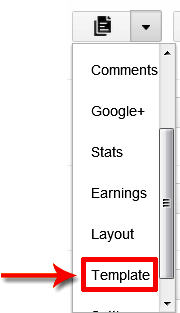
  2. Now click on the drop down menu and choose Template.
  3. blog template
  4. Press Backup/Restore button located at the top right corner.
  5. backup restore button
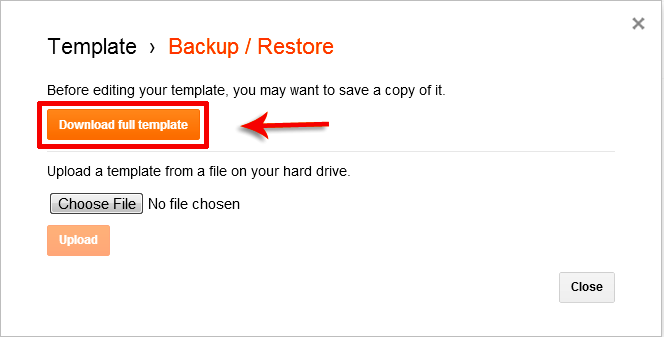
  6. First you should download your existing template as a backup. So, click on “Download full template” button.
  7. download template
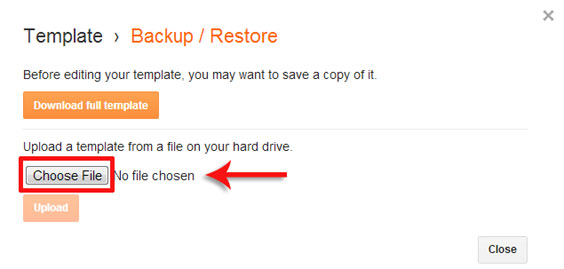
  8. Now click on Choose File button and choose your new template which you want to apply to your blog.
  9. choose template
  10. Once you select your template, simply click on Upload button for final step.
  11. You are done!
Note: If you just started your blog then you must read below tutorials to improve your blog performance.

EnjOy..:)
Bugs Of Techn0l0gy

Lots of things, new iPad game

First of all, I'd like to thank all those who donated for the iPad fundraise! I already wrote directly to those who donated, but I want to publicly thank them, too.
Here's a couple of photos of the iPad showing a post on the BennuGD forums and Puzsion running in the iPad (it works great!):


It's a refurbished iPad 2 -they're a bit less expensive- with 16GiB storage space and it's pretty cool, so thanks!
In the days since I wrote the last post, a few things that might interest you happened:
  • After buying the iPad, I believe I found the cause of the graphic glitch that appeared in it and I believed I've fixed it: BennuGD automatically starts the graphic mode to a default one (320x240) and then when you do a set_mode() it tries to switch to the mode you specify.
    For some reason, this was failing in the iPad 2 but not in the rest of hardware from Apple nor in the Simulator.
    The workaround is that now BennuGD won't set the graphic mode until you do a set_mode. This also helps in Android.
  • 32bpp graphics mode is now working in iOS! iOS -like OSX- uses BGR color ordering, instead of RGB, like most other OSes do. I integrated DCelso's patches for the PSP and expanded them a bit where needed and now 32bpp seems to be working just fine.
    There's still some work to be done, yet, as now all the iOS games start in 32bpp, no matter what you set with set_mode(). It shouldn't be a problem in most cases, but you know, this project wants to always be as compatible with upstream BennuGD as possible.
  • I created and integrated mod_curl. It's just a wrapper around libcurl that allows you to work woith resources in the internet. This allows you to perform two very interesting tasks:
    • Download resources from the internet, thus allowing you to bypass the 20MiB AppStore limit.
    • Do some client-server communication like fetching highscore tables from your servers, checking for updates...
  • Integrated mod_fmodex, which is another wrapper around FMOD Ex. FMOD Ex is one of the most powerful sound engines available and it's used in many AAA games. Right now it provides sound playback with variable frequency plus spectrum analysis (think Singstar) for both microphones and playing sound. The binding will be expanded in the future as needed so if you feel a particular area needs improvement, please let me know.
    Please take into account that FMOD Ex is a commercial product and it costs quite a bit of money in case you want to profit from it. Check here for a full list of prices. Also, please note that FMOD Ex is entirely optional. You can continue to use the regular BennuGD sound system, as usual.
  • Integrated mod_multi into the iOS builds so that people using iOS -the code was already working in Android- can implement multitouch in their games. The implementation is still a bit rough around the edges, but it's working and solving the remaining issues should be easy.
  • I compiled the old code found in the available templates for the simulator and uploaded it to the google code project site.
  • I integrated mod_curl into the old code found in the available templates and uploaded both the iOS and the iOSSimulator templates. You can find these in the Downloads page in the project site.
  • I compiled the new code found in the SVN -containing the new code which directly uses  the SDL1.3 API and not its ugly SDL1.2 compatibility layer- into a template and sent it to those who donated for the iPad 2.
  • I worked with the guys at iPhoneGamesDev.com on their new iPad game called iDraw for Family, which you can already get from here.
    Yeah! I coloured the teapot! Did I unlock any achievements?
That's pretty much it! In the next few days I'll try to upload some sample code for the new modules so that those interested can start coding with them.
Hope you liked the news!

Template updated, includes mod_chipmunk!

Today I'm publishing an updated version of the template that integrates mod_chipmunk.
You can see what mod_chipmunk can do in the video below:


The binary in the template is also compiled for ARMv6 & ARMv7 (the latest one only worked on ARMv7 chips because of a mistake I made when compiling) so that you can develop BennuGD games for iOS using older devices. Please note that physics simulation can be a very processor intensive task and might slow down your games' execution when used improperly.

Hope you like it!

Xcode 4 Template for running BennuGD games on iOS

I've just uploaded a template to the Google Code project page that serves as a small template that you can use to run your games in your iOS device and submit it to Apple's iTunes Connect portal in order to have it reviewed for inclusion into their App Store.
You can download the template from here.

Please bear in mind that here I'm assuming that you've got an iOS developer license in place and that you've put your device into development mode in the Xcode "Organizer" window.
Also, I'll be targeting Xcode 4. Xcode 3 might work, but it's untested.

So, after you've downloaded the template, uncompress it and open the Xcode project. You should see something like this:

In the summary panel in the right you'll most probably want to edit the default data (program name, version, interface orientation and icons for both the iPhone/iPod and the iPad).
Now, I'll assume you've got a working BennuGD game designed with your iOS device in mind available. I'll use the accelerometer test I posted earlier, modified to use the BennuGD logo as the bouncing box.
Right now the template cannot compile your BennuGD code directly (although I'd like to add that feature to the next version of the template) so you must already have your dcb compiled and renamed as main.dcb. You can see the resources used in my test project below:
Drag all the resources to the Xcode window's "Game Resources" group.


And be sure to check "Create folder references for any added folders" box in the dialog that'll appear. I advice you against checking the "Copy items to destination group's folder (if needed)" option as it'll make it harder to update your game resources.


Please make sure that the copied folders in the "Game Resources" group now appear in blue (and not in yellow; yellow is bad here).


Now, plug your iOS device in and change the compilation target to it:


Now, just click on the "Run" button. Your game will get copied to your device and run from there. Please understand that when you run your app using this method, it will run under a debugger session (you can output things to the debugger log by using "say") and so it'll start slowly. This is normal.
If you want to terminate your game at any given time, just click on the "Stop" button.
If you now run your game directly from your device, you'll see it runs at full speed.

In a next tutorial, I'll tell you how to upload the resulting binary to the iTunes Connect portal for review directly from this Xcode session, so stay tuned!

Hope you find this info useful!


[Edit] The template includes an updated BennuGD interpreter binary.
iOS game template

Today I'm releasing a game template for iOS. It should work fine for jailbroken iOS devices. Just copy the uncompressed package to the "/Applications" folder in your device.
Also, please make sure that the file "main" has executable permission set, otherwise it won't work.

Just copy your compiled DCB as main.dcb in the folder and put your resources there, it should work.

One note: rotation is not working as expected yet, but you can just rotate your game with the following code:
scale_resolution_orientation=1;
Get the template from here (Removed).

If you've got any question, let me know. Soon I'll write a small FAQ with more info and I'll try to update the build to a more recent SDL revision.

[Update] I've published template for Xcode that makes it easier to upload your games to your device.

Blog Archive